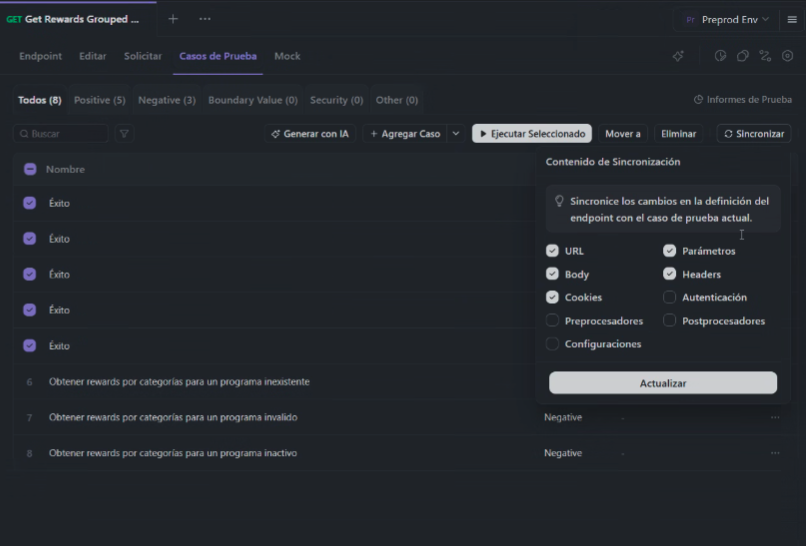
When selecting multiple test cases and clicking “Synchronize”, critical information from the test cases is unexpectedly removed.
After synchronization, the following data is lost:
• Pre-processors
• Post-processors
• Parameters
• Test case name
This causes irreversible loss of configuration and impacts test execution and maintenance.
Steps to Reproduce
1. Go to an API endpoint in Apidog.
2. Open the Test Cases tab.
3. Select multiple test cases (checkbox selection).
4. Click on Synchronize.
5. Confirm synchronization using the default options (URL, Parameters, Body, Headers, etc.).
6. Observe the synchronized test cases.
Expected Result
• Only the selected endpoint definition elements (URL, parameters, headers, etc.) should be updated.
• Existing test case data must be preserved, including:
• Pre-processors
• Post-processors
• Parameters
• Test case name
Actual Result
• The following elements are deleted or reset in the affected test cases:
• Pre-processors
• Post-processors
• Parameters
• Test case name
• This happens when multiple test cases are synchronized at the same time.
Evidence
(See attached screenshot)
** Impact**
• Loss of test logic and validations
• Manual rework required to rebuild processors and parameters
• High risk of undetected issues in automated and manual testing
• Not safe to use bulk synchronization in its current state